Piping Engineer
Learn how to use DiCivil - Piping Engineer to design, edit and validate your piping networks faster and easier.
Piping Engineer is a comprehensive tool for designing, editing, and validating Civil 3D piping networks. The tool provides advanced elevation design capabilities, slope validation, system data editing features, and pipe and structure data editing with table interfaces.
Key Features:
- Elevation Design - Advanced elevation control with hold reference options, Edit Pipe Run, Auto Flow Edition, and Create Network Profile View.
- System Edition - Flexible system modification with multiple editing modes.
- Pipe and Structure Data Tables - Comprehensive table interface for pipe and structure management.
- Profile Management - Save and reuse configuration profiles.
- Auto-Flow Adjustment - Automatic upstream/downstream adjustments.
- Slope Validation - Quick Slope validation tool.
Getting Started
Tool Interface
Piping Engineer provides an interface for managing Civil 3D piping networks. The main interface is organized into two primary tabs: General Data to manage the Pipe and structure data and Elevation Design to easily design the pipes in elevation.
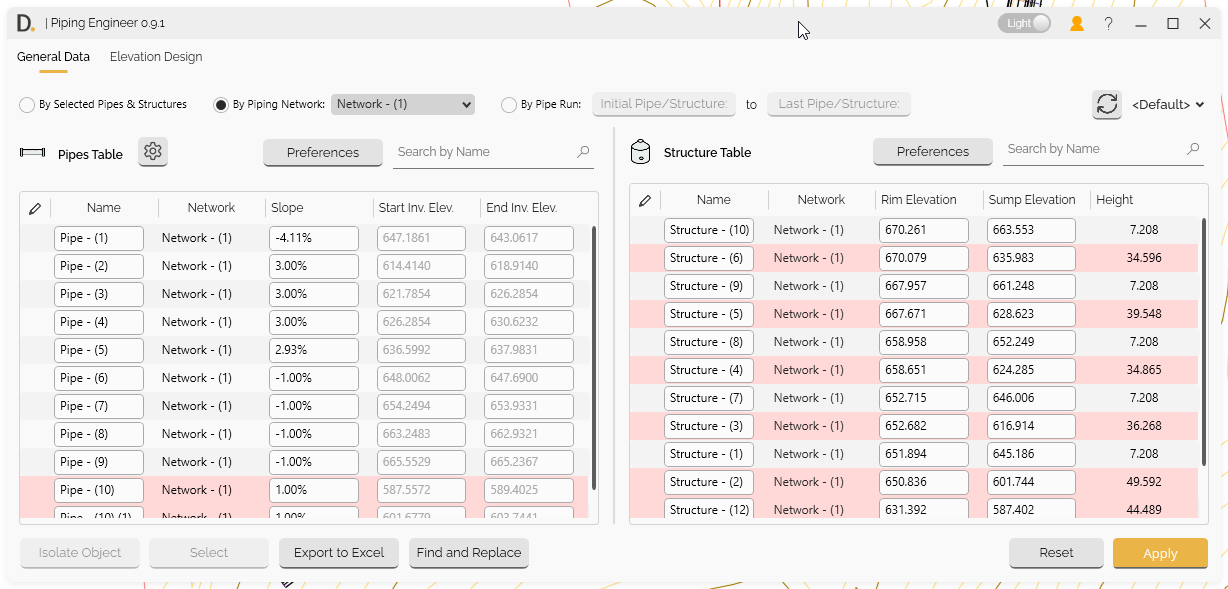
Image: Tool interface of Piping Engineer showing 2 tab sections
Note: the version on the image may not reflect the latest version of DiCivil Package.